
ADEA Launches Portal Assistant to Help Users Navigate the ADEA Research Data Portal
ADEA Launches Portal Assistant to Help Users Navigate the ADEA Research Data Portal
Last month, ADEA added the Portal Assistant, an AI-powered chat guide, to its ADEA Research Data Portal. Together with ADEA members, the ADEA research team shaped a tool to help users navigate the portal.
The new built-in guide offers step-by-step directions to dashboards, data definitions, filters and reports.
Stuck on a dashboard, a data definition, a filter or a report with no idea what to do next? The Portal Assistant is built into the data hub to point you in the right direction and answer common portal questions.
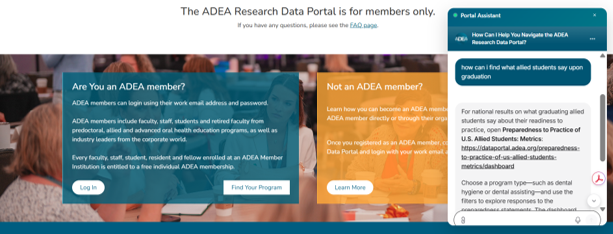
How It Works
- Click the Portal Assistant chat bubble, which appears on every page of the portal, or select the home page card which says, “Have a question? The Portal Assistant can help you.”
- Type a question in plain language, such as:
- How do I use this dashboard?
- What does this metric mean?
- How do I filter the data?
- Where can I find a specific report?
- Get step-by-step directions tailored to the dashboard you are viewing, plus live links that take you to the right place.
What It Can—and Can’t—Do
- It is a guide to the portal, not a research assistant. It shows you where information lives and how to use the portal’s dashboards, data definitions, filters and reports, but it does not provide data values.
- It does not grant access to restricted dashboards. Need access to a restricted school dashboard? It will explain how to request it; requests are approved by the reviewer each dean designates.
- It is available on the homepage before even logging in, but because answers are pulled from the portal’s FAQs and Terms and Conditions, it will not provide data.
Try it today at dataportal.adea.org. For questions or feedback, please email adeadata@adea.org.
Published on November 11, 2026